

I’ve always viewed web development as a fascinating puzzle. On one side, you have the brand narrative—the visual story, the emotion, and the connection you want to build with your audience. On the other side, you have the logical code—the raw performance, the milliseconds, and the underlying technical architecture.
For years, the digital industry believed you couldn’t have both in a single, easily manageable platform. The prevailing myth has been that if you want a perfect 100/100 Core Web Vitals score, you must abandon visual builders entirely and invest in a highly complex, custom-coded headless architecture.
Visual builders were broadly dismissed as too heavy, too cluttered, and inherently flawed. But in 2026, as engineering standards have evolved, we need to address a difficult and quiet truth: a slow Elementor site is no longer a platform limitation. It is a developer skill issue.
At our agency, we build high-performance custom WordPress sites that deliver measurable ROI. We solve this puzzle daily, proving that you can achieve perfect technical performance without sacrificing the agility and creativity of a visual interface.
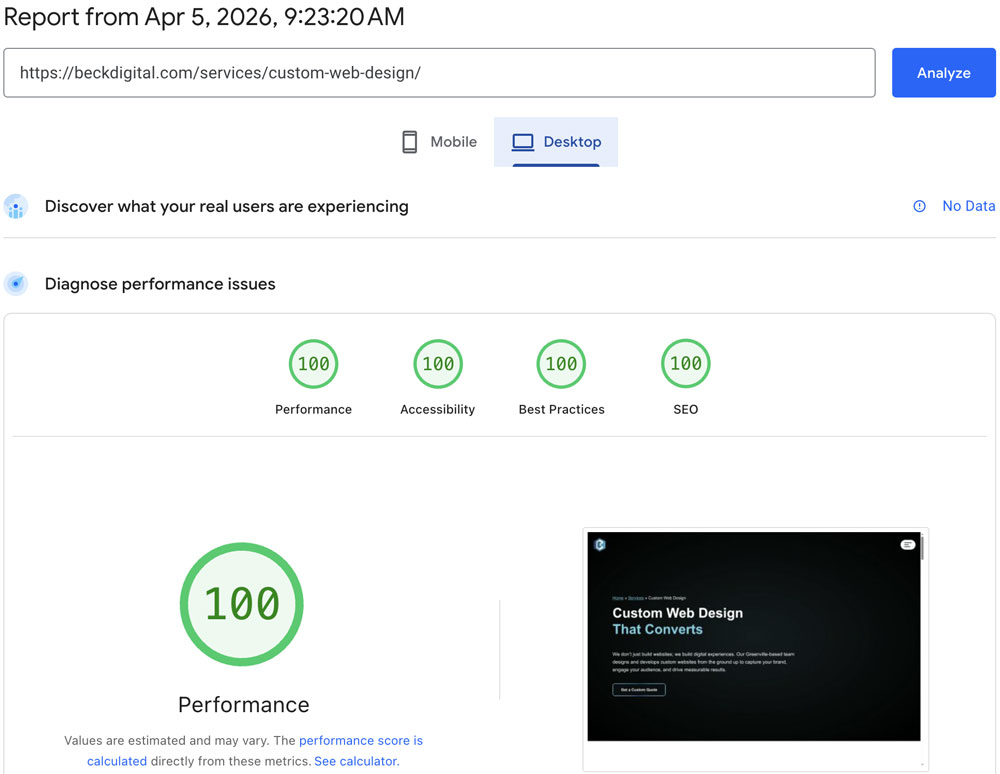
Here is the engineering reality behind achieving perfect performance metrics on Elementor Pro, and why your current tech stack might be holding you back unnecessarily.
The Death of the “Bloat” Myth: How Elementor’s Asset Manager Changed the Game
Let’s look closely at where the “bloat” myth originated. To be fair to the skeptics, it wasn’t entirely unfounded. Five or six years ago, visual builders were blunt instruments that loaded every single line of CSS and JavaScript on every single page.
This created massive, heavy Document Object Models (DOMs) and terrible page speed scores. The browser was forced to download and parse megabytes of useless code before the user could see anything. But the platform evolved while many developers’ habits did not.
Elementor Pro’s modern Asset Manager changed the game entirely. It introduced strict conditional asset loading. Now, the platform’s core logic only loads the specific CSS and JavaScript required for the widgets actively rendered on the exact page you are viewing.
If you don’t use an accordion or a slider on your homepage, those scripts simply do not load. The DOM remains remarkably clean. To master Core Web Vitals in WordPress in 2025 and beyond, you must understand how LCP, INP, and CLS interact with the DOM structure.
When a developer complains about Elementor bloat today, observation usually reveals they are building pages incorrectly. They are nesting containers unnecessarily, relying on outdated widget logic, or failing to utilize the native Asset Manager effectively.
We approach this puzzle differently. We use strict DOM element management. We build flat, highly efficient container structures that minimize the depth of the HTML tree. The result is a lightweight, agile page that passes Core Web Vitals with flying colors.
Speculative Loading and the Main Thread: Deferring Non-Essential Scripts
The real battleground for performance isn’t just what you load, but when you load it. The browser’s main thread is single-minded and can only process one task at a time. If it is busy parsing a massive tracker, it cannot respond to user clicks.
This delay ruins your INP (Interaction to Next Paint) score. Worse, it creates a frustrating, unresponsive experience that makes your brand feel unreliable. To solve this, we rely on heavily deferring non-essential scripts and implementing modern speculative loading protocols.
Speculative loading in WordPress allows the browser to intelligently pre-render pages the user is likely to click on next. By the time they actually decide to click, the next page has already loaded in the background. It feels instant.
But this magic only works if the main thread is clear. That requires a disciplined, ruthless approach to JavaScript. We defer any script that isn’t strictly critical to the initial above-the-fold visual render to keep the experience snappy.
This approach allows us to maintain rich, engaging website features. You can absolutely still implement zero-click conversions and micro-interactions to capture leads without penalizing your speed.
The key to the puzzle is that those beautiful micro-interactions cannot block the main thread. They must be sequenced logically. When you balance the visual narrative with logical script sequencing, you get an enterprise site that feels alive and technically flawless.
FinTech Speed Standards: Why a 100ms Delay Costs You Conversions
Let’s apply these technical concepts to the financial services sector, where the stakes are incredibly high. In FinTech, speed isn’t just an SEO metric designed to appease Google. Speed is your primary trust signal for institutional investors.
High-net-worth clients demand prestige and flawless execution. A slow website communicates technical instability and poor infrastructure. In our work defining simplicity as sophistication in financial services web design, we’ve made a consistent observation.
A 100ms delay costs you conversions.
It introduces immediate friction into the user journey. It gives the user a fraction of a second to second-guess their decision or wonder if the platform is truly secure. We know that milliseconds directly impact revenue.
Furthermore, we must design to overcome “AI Blindness”—the consumer fatigue associated with automated, impersonal interfaces. We rely heavily on trust-focused design and tactile clarity in FinTech UI to ensure users feel entirely in control.
Tactile clarity requires immediate, undeniable feedback. If a user clicks a toggle to transfer funds and the system lags for even a second, the illusion of control is broken. Achieving a perfect 100/100 score ensures the UI responds instantly.
The BECK Digital Optimization Framework: Native Performance Lab vs. Third-Party Overload
When enterprise marketing directors come to us frustrated with a slow WordPress site, we almost always find the exact same culprit: third-party overload. Developers often try to fix a slow site by hastily throwing more plugins at the problem.
They add aggressive caching, CSS minification, and image optimization plugins, hoping one of them will act as a magic bullet. Instead, they create a fragile, bloated house of cards that conflicts with itself. You cannot fix bloat by adding more bloat.
Our framework is highly contrarian. We remove plugins. We rely strictly and deeply on Elementor’s native Performance Lab features. The engineers at Elementor have spent years baking sophisticated optimizations directly into the core platform.
When you use heavy third-party optimization tools, they almost always fight against Elementor’s native Asset Manager. By sticking to the native Performance Lab, we streamline the entire architecture and let the platform work as intended.
This approach creates a significantly lower Total Cost of Ownership (TCO) for our clients. You don’t have to fund the maintenance of a complex headless stack, and you don’t have to pay developers to troubleshoot arbitrary plugin conflicts.
If your current site requires a fundamental, ground-up overhaul, our custom web design services focus strictly on this performance-first architecture from day one. We build the puzzle correctly the first time.
But building it right is only half the equation. Keeping it fast requires absolute vigilance. “Plugin creep” is the silent killer of Core Web Vitals. Over time, well-meaning teams add tracking tags and pop-ups that degrade speed.
Our website maintenance programs provide the rigorous monitoring required to protect your investment. Because speed is the foundation of visibility, this feeds directly into our SEO services.
Engineering Your Next Move
Achieving a 100/100 Core Web Vitals score on Elementor Pro in 2026 is not a myth. It is a measurable reality available to teams who are willing to prioritize logical code and strict asset management. It is about working with the tool, not against it.
If you are ready to begin unwinding the performance puzzle on your own site, start with this immediate checklist within your WordPress dashboard. Navigate to Elementor > Settings > Features to enable modern experimental optimizations.
- Enable Optimized DOM Output to immediately flatten your HTML structure.
- Enable Improved CSS Loading and Improved Asset Loading.
- Conduct a ruthless audit of your active plugins and delete conflicting “optimization” tools.
- Ensure your analytics and marketing JavaScript are properly deferred to prioritize the main thread.
Speed is not just a technical checklist. Speed is a critical business decision. It is the exact intersection where your beautiful brand narrative meets measurable, undeniable ROI. It tells your customers that your business is efficient and professional.
If your enterprise tech stack is currently failing Core Web Vitals and costing you conversions, it may be time to stop applying temporary band-aids and solve the puzzle at its root. Precision engineering is the only way to stay competitive in 2026.
Contact our leadership team for expert digital consulting. We will thoroughly audit your current WordPress architecture and provide a clear, uncompromising, engineering-led path to flawless performance and 100/100 scores.